uv: Python package and project manager
IDEAS / CODE / PROCESS *
Edited article
Last edited:
uv is a tool for working with Python projects and packages.
It can perform tasks for which we would normally use other tools:
pip, venv, pip-tools.
With uv we can:
- create virtual environments
- install packages
- install a project's dependencies
- resolve version conflicts
- save exact dependency versions
- run commands within the project environment
Pip and uv
pip is the Python package installer:
pip install numpyYou can also install a project's dependencies:
pip installuv can also work as a package installer in the same way as pip by using (this does not mean it is installed through pip; you are only telling uv to “behave like pip”):
uv pip install numpyBut it also has its own commands that let you manage a complete project:
uv syncIn other words, uv has two operating modes:
uv
│
├── Pip-like mode
│
│   uv pip install
│   uv pip uninstall
│   uv pip list
│   uv pip freeze
│
└── Project management mode
    │
    uv sync
    uv lock
    uv add
    uv remove
    uv run
Differences
| PIP | UV |
| --- | --- |
| Installs packages | Installs packages |
| Resolves dependencies | Resolves dependencies |
| Can INSTALL from pyproject.toml | Can work directly with pyproject.toml |
| Usually combined with venv | Can create the virtual environment directly (venv) |
| Does not use uv.lock | Can use uv.lock |
| Focused on installing packages | Focused on managing a complete project |
Advantages of uv
More tools in a single program
With pip:
python3 -m venv .venv
source .venv/bin/activate
pip install .
With uv:
uv venv
uv pip install .
Faster dependency resolution
uv is designed to perform tasks such as:
- resolving dependencies
- downloading packages (including private Forgejo packages)
- installing packages
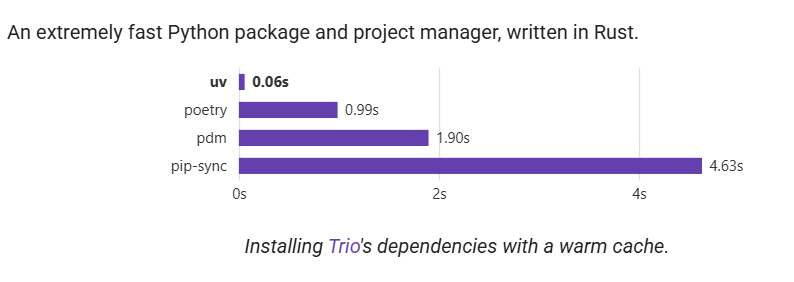
Chart taken directly from the Astral website (it may be exaggerated).
Project management
uv can work directly with:
pyproject.toml
uv.lock
.venv/
Example:
uv syncThis synchronizes the environment with the project's dependencies. It automatically creates the uv.lock file; if it already exists, uv updates it when necessary.
Dependency lock file (uv.lock)
The uv.lock file stores the resolved dependencies of the project.
While pyproject.toml specifies dependencies broadly, this can allow incompatible versions. For example, if we specify “numpy≥2.0” and another package we depend on uses “numpy=2.2”, in practice versions 2.0 and 2.1 are not valid even though pyproject.toml accepts them.
uv.lock stores the exact dependencies that do work (not just one dependency; there can be several versions).
For the previous example, uv's resolver would detect the correct version and install it directly.
If we had something like “numpy==2.0” and the other package required “numpy>2.1”, this would be a direct version conflict and would have to be corrected manually.
Errors with Python versions
uv also checks that dependencies are compatible with all Python versions that the project claims to support.
Supported Python versions are specified in pyproject.toml with:
requires-python = ">=3.10"This indicates that our project must be able to work with Python 3.10, 3.11, 3.12, and so on.
One of our dependencies may have more restrictive requirements. For example:
Our project:
Python >= 3.10

astropy >= 7.2:
Python >= 3.11
In this case there is a conflict.
Even if we are running uv sync using Python 3.11, uv detects that our project also declares compatibility with Python 3.10 and that the dependencies cannot be resolved for that version.
How to solve it
We need to check the actual minimum Python version supported by our project.
If our project really needs Python 3.11 or later, we must change:
requires-python = ">=3.10"to:
requires-python = ">=3.11"This correctly indicates:
Project:
Python >= 3.11

Dependency:
Python >= 3.11
In these cases, we should mainly review:
requires-python = "..."and verify that the Python range we declare is compatible with the project's dependencies.
Disadvantages of uv
Learning new commands
If we are used to pip, it will feel strange at first to distinguish between:
uv pip installand:
uv syncuv can detect problems that did not appear before
This may sound like an advantage, but in reality, seeing version errors in a project that did not have them before can make us think uv is a bad tool or that it has bugs, when they are actually our fault.
Example, in pyproject.toml:
requires-python = ">=3.10"and another dependency:
Python >=3.11As explained earlier, this can cause an error when resolving the project.
Switching from pip to uv can change version resolution
If versions are declared broadly, such as “numpy≥1.26”, a new installation may select a more recent version (which, most of the time, will not be a major problem).
COMMANDS
Installation
As simple as:
curl -LsSf https://astral.sh/uv/install.sh | shCreate a virtual environment
With Python, we would normally use:
python3 -m venv .venvWith uv:
uv venvTo choose a specific Python version:
uv venv --python python3Then activate it as usual:
source .venv/bin/activateUse uv as if it were pip
This is the simplest option if we have just switched to uv.
Install a package
uv pip install numpyInstall a specific version
uv pip install numpy==2.2.6Install the current project
uv pip install .Install the project with extras
uv pip install ".[private]"Use uv as a project manager
uv sync synchronizes the project's dependencies with the environment (creating or updating the lock file).
If we want an extra (optional dependencies), we use:
uv sync --extra privateuv add adds a dependency to the project, for example:
uv add numpyuv remove removes a dependency from the project:
uv remove numpyuv run runs a command using the project's environment:
uv run python main.pyFor version numbers in your own packages, see my guide to Python package versioning with SemVer and Git tags. To automate testing and publish those packages, continue with the Forgejo runners and CI/CD guide.